Sorry if this has been stated somewhere before (honest, I did search).
Just used the “Help Chat” for the first time to report a waypoint for removal.
I am at the stage where I have got the ticket number and “you will receive an update in a few hours” message.
Am I supposed to leave the PC on until I get the response?
If I don’t, as it still gone to staff to sort?
Am I able to log back in with the ticket number for the update?
You don’t have to leave the PC on, you can re-log in using the same device to see the help chat message. The message usually last 1-2 days after support team responding and close the ticket for me.
When the support team reply back, you should see the (1) pop up on the chat button, after checking (?) help tab of course.
Am I understanding this correctly: once they close the ticket, you don’t get to see the response?
I’ve opened support tickets via that chat before, but I’ve never seen a response. After a while, I just gave up and stopped submitting tickets altogether. So it’s possible they did respond, and I just never saw the response, because they closed the ticket within 48 or so hours?
I believe so based on some of my experience before. They can close the ticket, but you are still able to see the chat for 48 hours(in my experience) before it is gone.
Assuming we’re talking about the same form- the form at Niantic Wayfarer - I’ve never seen a response to any ticket opened there.
Which isn’t to say Niantic doesn’t respond to those tickets: I’ve just, personally, never seen one there. It’s possible I got one and didn’t see it, but I obviously can’t verify something I didn’t see.
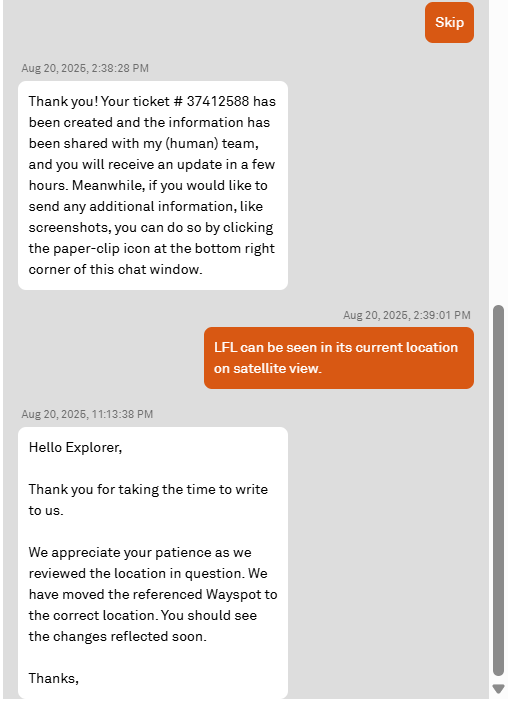
I have the “support ticket saver” tool from wayfarer.tools installed, so i can see old chat conversations. From my last one i got the ticket number directly after submitting the information to the bot, then got the reply not long after:
I didn’t comment on this post earlier because I know some people lose their help chat history while waiting on the reply. I don’t have that happen. Plus, I installed the ticket saver if I need to go back further for a reference.
The current chat has completed but for future reference…
I have installed the plug in and I know see the “Tickets” link.
Will any future Ticket automatically save there?
Is there any way to save the current ticket to it?
Nothing happens when I click the link, is this because there is nothing to show?
Reading between the lines, this is compatible with what @NianticAaron said. It is possible to provide all possible resolutions while still leaving issues unresolved.
The problem is that sometimes there is no resolution acceptable to the person raising the ticket, so all possible resolutions have been provided, but the issue remains unresolved for you.
i can confirm that there have been plenty of times that i have messed up and just explained what i need when i got to the end and they were able to figure it out and help.
 but thanks for the help so far.